Technical guide
MikroTik enterprise management: operate a multi-site RouterOS fleet
When site count, team size and audit requirements grow, ad-hoc MikroTik operations hit a ceiling. Enterprise management structures global inventory, supervision, backups and remote access for the whole fleet—not just one isolated router.
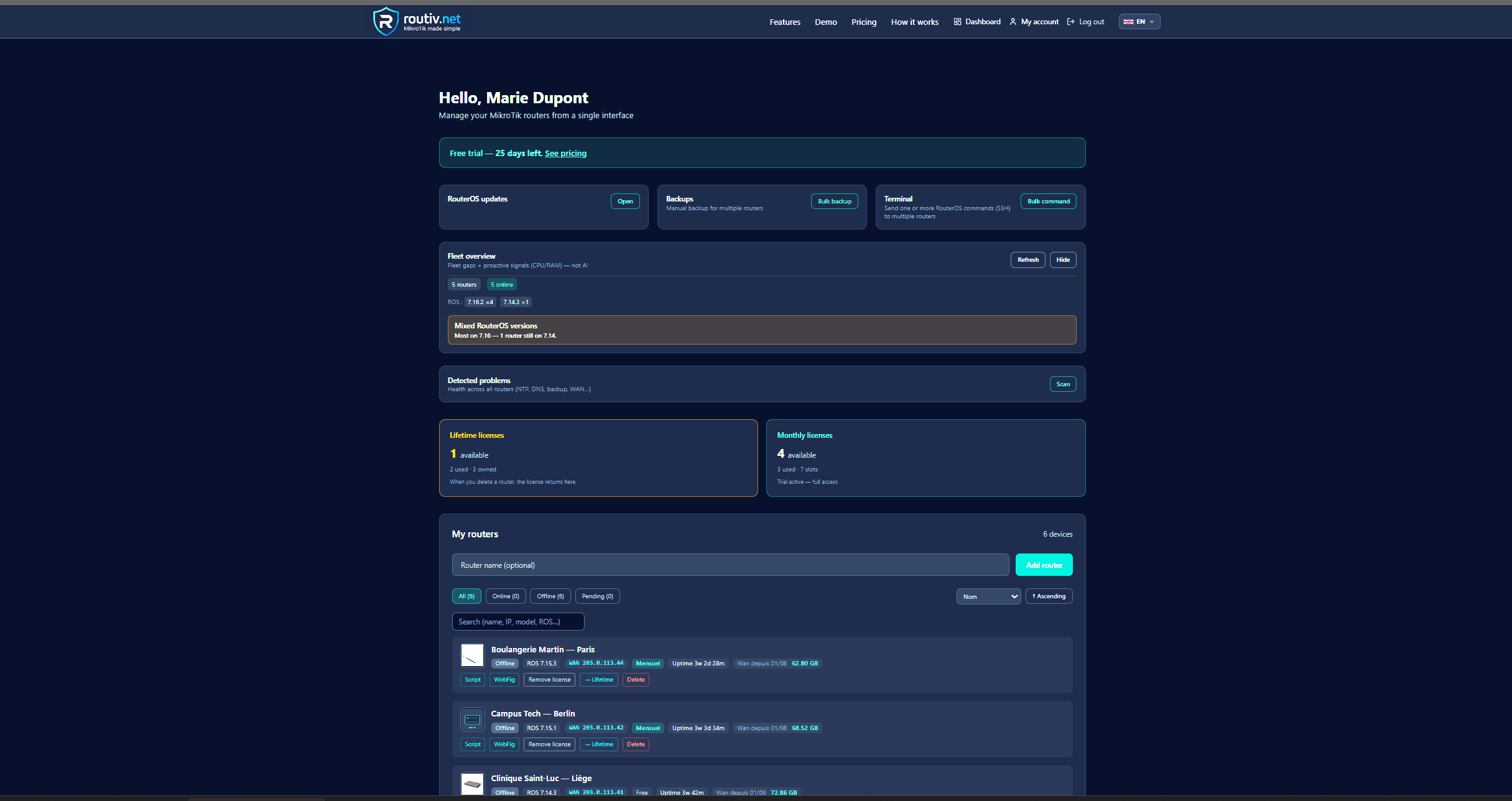
Enterprise MikroTik management beyond a single site
MikroTik enterprise management is the set of practices and tools that keep a distributed RouterOS estate under control: branches, warehouses, customer sites, regional PoPs. The question is no longer “configure this router” but “deliver a homogeneous, auditable service level across N sites”.
Scale symptoms are familiar: stale spreadsheet inventories, admin ports left open “temporarily”, forgotten backups, incidents found by the business before monitoring, and contractor turnover without context transfer.
An enterprise approach cleanly separates the data plane (user traffic at the site) from the management plane (supervision, backup, support access). RouterOS can do both; the organisation and platform must enforce that split across the fleet.
Who cares: internal IT, integrators, MSPs
Three profiles converge on the same technical building blocks with different priorities.
Internal network / IT
Needs standardisation, maintenance windows, correlation with the wider stack (ITSM, existing monitoring). Governance of MikroTik admin accounts and proof of backups matter as much as a latency graph.
Multi-site integrator
Deploys and maintains dozens of routers under project constraints. Enterprise management cuts context-switch time between tickets and limits regressions after config changes.
MSP
Must isolate customers, allocate resources, and prove who touched what. Without isolation and logs, the support model does not scale—even with excellent RouterOS engineers.
Pillars of enterprise MikroTik management
Whether you build, buy or hybridise, five pillars show up in fleets that age well.
- Living inventory: every router identified, versioned, tied to a site or customer
- Observability: offline, metrics, actionable alerts—not charts alone
- Continuity: off-site backups, retention, tested restore
- Access: controlled sessions, least privilege, end of permanent public Winbox
- Governance: who can see / act, and a trail of sensitive actions
Multi-site: management connectivity
The number-one friction in enterprise fleets is reachability for management. Nested NAT, different carriers, local security policies: exposing API or Winbox on the internet rarely survives security review.
Viable patterns are centralised VPN, outbound tunnels initiated by the site, or a mix. Modern MikroTik enterprise management often prefers an encrypted outbound channel: the site does not open inbound admin ports, which simplifies customer firewall rules.
Impact on support process
When the management channel is stable, the NOC treats offline alerts as network incidents rather than “we cannot connect”. Management-tunnel quality becomes a KPI alongside the business circuit.
Security and compliance across the fleet
In enterprise contexts a MikroTik fleet affects site availability and sometimes sensitive traffic. Minimum requirements go beyond a strong password.
- Individual accounts or SSO on the management platform—not one shared admin
- Time-boxed remote access sessions
- Action logging (who opened Winbox, who ran a restore)
- Lab / prod separation in inventory
- Periodic review of RouterOS versions and end-of-support hardware
Operating model: NOC to field
Effective enterprise management aligns to simple rituals. Morning: offline queue and failed backups. Day: documented ad-hoc access. Night: collection and backup jobs. Structural config changes use a window and a backup-based rollback path.
Without that loop, even a polished dashboard does not change incident rates: tooling must fit process, not the other way around.
Build, buy, or hybrid
Build (scripts + API) maximises control and maintenance cost. Buy (SaaS or appliance) speeds time-to-value if inventory, monitoring, backup and access are covered. Hybrid keeps national monitoring and adds a RouterOS-specialised layer for MikroTik sites.
Decision criteria: site count, multi-tenant needs, data residency, internal capacity to run a platform, and tolerance for public admin ports.
Routiv for enterprise MikroTik management
Routiv is a cloud platform aimed at RouterOS fleets: multi-router dashboard, monitoring, off-site backups, alerts, Winbox/WebFig access in controlled sessions—without opening an admin port at the customer site. It targets teams that must industrialise multi-site MikroTik support instead of multiplying manual connections.
For an enterprise pilot: pick 3–5 representative sites, enrol the routers, validate alerts and backups for two weeks, then compare mean diagnosis time to your current method. 30-day trial on routiv.net.
FAQ
What is MikroTik enterprise management?+
The technical organisation and tooling to run a multi-site RouterOS fleet: inventory, supervision, backups, secure access and governance.
How many sites before industrialising?+
Often from 5–10 sites or from the first external customer (MSP). Chaos cost appears long before hundreds of routers.
Must we replace The Dude?+
Not necessarily. The Dude covers part of local supervision. Enterprise management adds distant multi-site ops, backups and access governance The Dude alone does not replace.
How do MSPs isolate customers?+
Logical fleet separation, user rights scoped to the customer, action logs—never one flat inventory without access control.
Are local backups enough in enterprise?+
No for continuity: hardware failure or on-site ransomware can destroy the only copy. Require off-site copies.
Preferred remote access model?+
Management VPN or tunnels without permanent public Winbox/API, plus revocable sessions for support.
How to measure project success?+
MTTA/MTTR on network incidents, backup success rate, % of devices on target version, disappearance of public admin ports, field support satisfaction.
Can RouterOS v6 still run in an enterprise fleet?+
Short term if inventoried and isolated; plan v7 migration on critical sites and treat versions as a tracked risk.
Related guides
30-day trial — no credit card
30-day free trial