Technical guide
MikroTik device management: run each RouterOS appliance properly
MikroTik device management is the lifecycle of one unit: what it is, whether it is reachable, which RouterOS build it runs, whether a backup exists off-box, and how to reach it without leaving Winbox open on the internet. This guide covers the technical practice before introducing a cloud approach.
MikroTik device management: exact scope
Configuration and device management are not the same job. Configuring a MikroTik (routes, firewall, VPN) happens in Winbox or WebFig. Device management answers operational questions: what is the serial and board-name? Which RouterOS version is in production? When was the unit last seen? Is there a recoverable export outside local flash?
Without that layer, every incident starts from scratch: reconnect, guess state, hope a .backup or .rsc still exists on the router. On a single critical site the risk is already real; as soon as several appliances accumulate, missing device management becomes a permanent operational cost.
On RouterOS v6 and v7, the API and system tools can read identity, load, uptime and trigger backups. Real device management standardises those calls, logs them, and presents a trustworthy state to the operator—it does not replace the router’s traffic-plane design.
Device inventory: what to capture
A useful MikroTik device inventory is not a frozen spreadsheet. It refreshes on every contact with the appliance and keeps at least the attributes support and internal compliance need.
- Identity: logical name, serial, board-name / model, architecture
- Software: RouterOS version, packages when relevant
- Connectivity: last seen, management tunnel or WAN address
- Operations: site / customer tags, intervention notes
- Backup: timestamp of last successful off-site backup
Why serial and board-name matter
For RMA or hardware swap, serial and model prevent spare mistakes. In a mixed fleet (hAP, CCR, CHR), filtering by board-name speeds update campaigns and capacity audits.
RouterOS version and technical debt
Without version inventory, security bulletins and syntax shifts (v6 → v7) stay theoretical. Device management turns “we should upgrade” into a concrete list of units you can pilot site by site.
Per-device health and availability
A managed device is one you know is answering. The simplest signal is last successful observation (heartbeat, tunnel handshake, API poll). Beyond online/offline, CPU, memory and WAN traffic help separate a saturated link from a runaway process.
Solid MikroTik device management keeps a short history: enough to explain yesterday’s incident, not necessarily years of expensive retention. The goal is diagnosis, not a data lake.
- Offline detection with a grace window (fewer false positives on reboot)
- CPU / RAM context around customer-reported spikes
- Correlate last-seen with planned maintenance windows
Per-device backup—not only “on the router”
RouterOS can save locally. That is not full device management: theft, brick or reset leaves the operator with nothing. Sound practice is a timestamped export stored off the appliance and linked to device identity in inventory.
For each MikroTik, define frequency (daily for critical sites, weekly for stable ones), minimum retention, and a restore procedure tested at least once. Device management should surface “last backup OK” as clearly as “online”.
Controlled admin access per device
Leaving Winbox permanently on a public IP is exposure, not management. The recommended pattern is a revocable path (site VPN, outbound tunnel, time-boxed session) tied to the device and, when possible, audited.
At device-management level, every remote session should answer: which unit, who requested access, until when. That reduces shared Winbox passwords and clarifies internal audits.
Sessions instead of permanent ports
A time-limited Winbox or WebFig session shrinks attack surface. Device management orchestrates open and close; the engineer focuses on network diagnosis.
Lifecycle: from enrol to decommission
A repeatable MikroTik device-management lifecycle has clear phases.
Enrolment
The unit is identified, a secure management channel is up, initial inventory is populated. Until then the appliance is a ghost to support.
Operations
Monitoring, backups, alerts, ad-hoc interventions. Business config changes stay with the engineer; the platform provides context (state, history, restore path).
Upgrade and exit
Before a RouterOS upgrade: fresh backup, maintenance window, post-upgrade checks. On decommission: revoke access, archive last export, remove from active inventory.
Common mistakes in MikroTik device management
Several anti-patterns show up repeatedly in RouterOS fleet audits.
- Excel inventory never resynced with the field
- Backups only on router flash
- One shared admin account on every device
- Winbox left public “until the VPN is ready” for months
- No record of who changed what on a critical site
Routiv and MikroTik device management
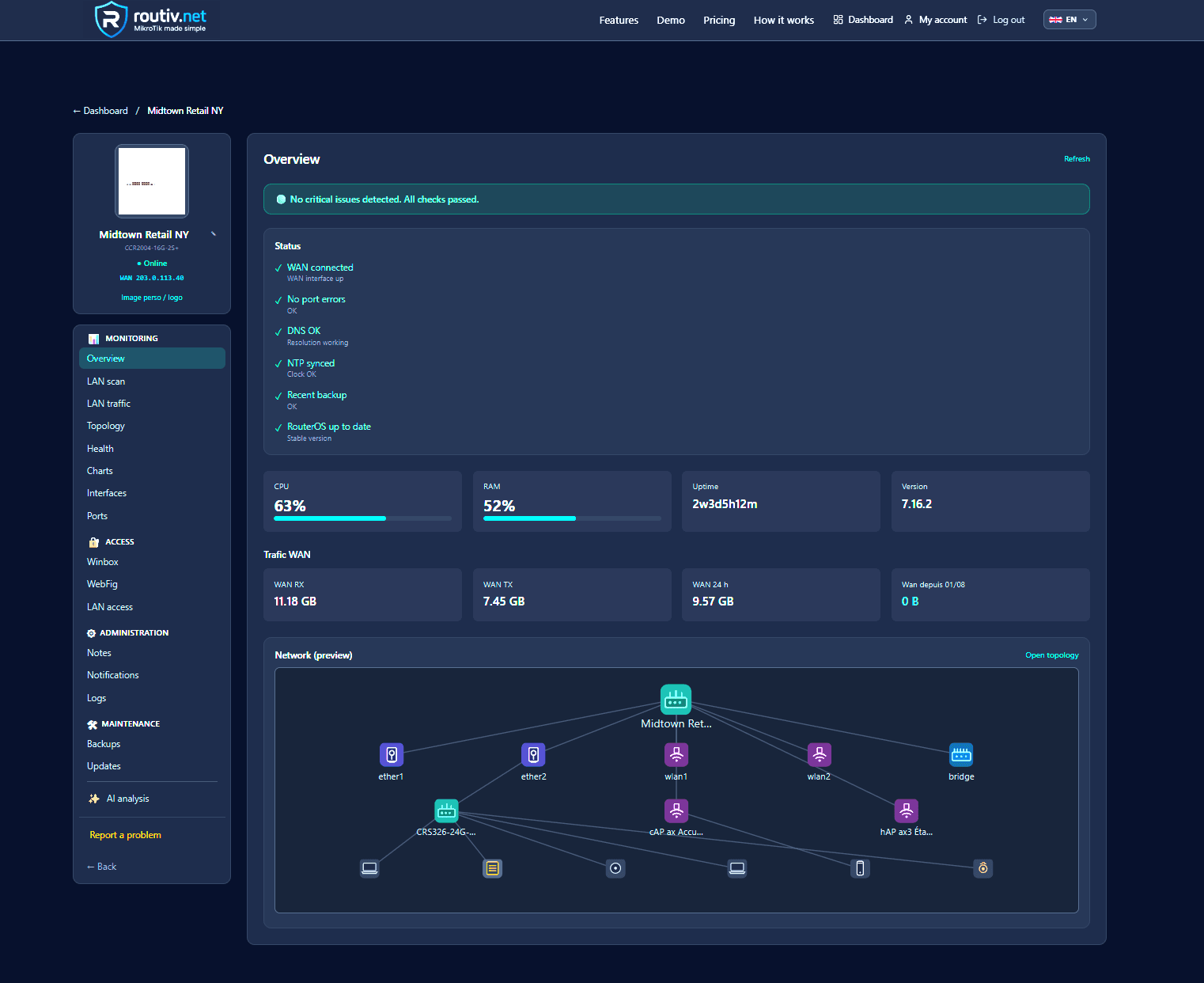
Routiv treats each MikroTik as a managed device: RouterOS identity card, availability, metrics, cloud backups and remote access in controlled sessions—without opening an admin port at the customer site.
Validate on a single unit: enrol a lab or pilot router, confirm inventory and first backup, then measure restore time on a real scenario. 30-day trial on routiv.net—multi-site scale is built device by device afterwards.
FAQ
What is MikroTik device management?+
Lifecycle management of each RouterOS appliance: inventory, health, off-site backup and controlled admin access—beyond one-shot Winbox configuration.
Device management vs fleet controller?+
Device management focuses on one unit. A fleet controller aggregates many units (multi-site, global policies). They complement each other.
Do I need tooling for a single MikroTik?+
If it is production-critical, off-site backup and offline visibility already justify basic device-management discipline.
How do I track RouterOS versions?+
Collect version on every API/tunnel contact and list gaps versus a lab-validated target build.
Where should device backups live?+
Off the router, timestamped, linked to device identity, with retention and a tested restore path.
Is public Winbox acceptable?+
Not permanently. Prefer VPN or temporary sessions orchestrated as part of device management.
What belongs in device notes?+
Site context, firewall quirks, contacts, incident history—everything that avoids rediscovering the field on every ticket.
Are RouterOS v6 and v7 managed the same way?+
Same principles (inventory / backup / access); API and syntax details differ—pilot before a wide campaign.
Related guides
30-day trial — no credit card
30-day free trial